Discord malware: How to stay safe and clean your device


As one of the most active communication platforms, Discord attracts a wide range of communities, and, unfortunately, attackers who want to exploit that activity. Discord’s built-in file sharing, large user base, and fast-moving chats can create opportunities for attackers to slip harmful downloads into the mix. This guide will walk you through the most common types of Discord malware, how to protect yourself from them, and what to do if your device has been infected.
What is Discord malware?
Discord malware is malicious software that bad actors spread through the Discord platform. It isn’t one specific virus or a single threat, but any harmful program delivered through the platform. Attackers usually disguise these programs as ordinary files or downloads, making them look like something harmless or familiar. Some strains only target Discord accounts, while others function like full spyware or remote-access tools that affect your entire device.
Common types of Discord malware
Discord is a safe platform for communication, but no platform is completely immune to risks. There are many types of malware that attackers can distribute through Discord, and here are some of the common varieties:
Discord account-stealing malware
These threats target the way Discord handles login sessions. Instead of infecting your whole device, they aim to slip into your existing Discord session and take over your account.
- Token grabbers: These are infostealer programs designed to locate and extract the session token Discord stores on your system to keep you logged in. With that token, an attacker can open your account without your password or two-factor authentication (2FA) and use it exactly as you would.
- Cookie theft: When you use Discord in a browser, your session relies on stored cookies. Cookie-stealing malware targets the browser’s cookie files and copies the data tied to your Discord session. Imported cookies allow an attacker to load your active web session until it expires or you revoke it.
Device-focused malware
These threats aren’t unique to Discord at all. They’re standard malware families that attackers hide inside files, links, or downloads shared on the platform. Once you run the file, the malware affects your entire device.
- Remote access trojans (RATs): Give attackers control over your device, letting them view files, log keystrokes, capture screenshots, or install additional malware.
- Ransomware: Locks your files or device and demands payment to restore access. Ransomware often spreads through trojanized installers or fake tools shared on Discord.
- Spyware: Designed to steal information by monitoring your activity. Spyware can capture keystrokes, screenshots, passwords, or other sensitive data.
- Adware: Floods your device with unwanted ads, pop-ups, and redirects. Adware is less dangerous than other threats but still disrupts your system and may bundle additional malware.
How malware spreads on Discord
In most cases, attackers use social engineering to spread malware on Discord. In other words, rather than exploiting technical vulnerabilities in the app, they try to trick users into clicking shady links or downloading malicious files. Below are some common tactics.
Fake Discord Nitro offers
Discord Nitro is Discord’s paid subscription that adds perks like animated emojis, higher upload limits, and custom profiles. Because many users want Nitro but don’t want to pay for it, attackers take advantage of that interest.
They send messages claiming you’ve been gifted Nitro, won a giveaway, or are eligible for a free upgrade. The link they provide usually leads to a phishing page designed to steal your credentials or a site that drops malware onto your device. Since Nitro gifts do exist legitimately, fake offers are easy to fall for.
Fake game downloads
This tactic works especially well in gaming-oriented servers where users are used to sharing builds, mods, or early-access test files. Attackers pretend to be indie developers searching for beta testers. When someone shows interest, they share a link to what looks like a game demo or installer. In reality, the download contains ransomware, spyware, or a RAT disguised as a game file. Running it installs the malware immediately and can infect your device.
Fake Discord invites
A legitimate Discord invite normally takes you to a server. Attackers sometimes create fake invite links or hijack links that used to lead somewhere safe. These bogus invites redirect you to a malicious server where you’re asked to complete a “verification step.” This “verification” usually involves downloading a file or installing a supposed anti-bot tool, which is malware in disguise. In some cases, the process also includes a phishing step, directing you to a fake login page designed to steal your Discord credentials.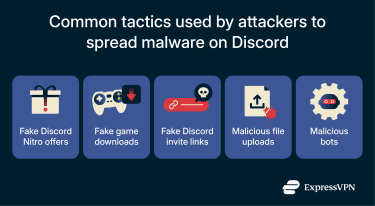
Malicious file uploads
Discord allows users to share files directly in chats and servers, which makes it easy for attackers to disguise malware as something harmless. These files may appear as images, game mods, cheat tools, scripts, or “updates,” but actually contain hidden executables or installers that infect the device once opened.
What makes this tactic particularly effective is how Discord hosts shared files. Anything uploaded to Discord is stored on its content delivery network (CDN) and given a permanent, public link. Attackers sometimes take advantage of this by uploading malicious files to their own private servers and then sharing the resulting CDN link elsewhere. Because the link points to Discord’s trusted domain, it’s less likely to be blocked by filters, and users may assume it’s safe simply because it comes from a familiar source.
Malicious bots
Attackers also use Discord bots to automate many of the same scams they run manually. Once added to a server, a malicious bot can rapidly push out phishing links, fake Nitro offers, or files that contain hidden malware across multiple channels or directly to users. They can also guide users through bogus “verification” steps or security checks that ultimately lead to credential theft or a malware download.
Bots can also support an attack behind the scenes. Certain malware families use Discord bots or the Discord API as a command-and-control channel, letting infected devices send stolen data out and receive new instructions without drawing attention.
What makes these bots effective is their mix of automation and built-in credibility. Users are used to bots giving instructions, so they’re less likely to question suspicious prompts. Plus, attackers can spread their payloads far more efficiently than they could through manual messages.
How to know if you're infected
Malware often leaves clues. Here are some common signs that may indicate a malware infection on your Discord account or device:
Account-level symptoms
If you’ve fallen victim to token grabbers, cookie stealers, or credential phishing, your account activity may start to change in ways you didn’t initiate.
- Unfamiliar activity: Messages you didn’t send, servers you didn’t join, or settings you didn’t touch can indicate someone else is using your session.
- Strange DMs reported: Friends telling you they received suspicious links or messages from your account often means an attacker is using it to spread malware.
- Unexpected logouts: Getting kicked out of Discord for no reason can happen when someone imports your active token or cookie.
- Security emails you didn’t trigger: Notifications about changed passwords, emails, or 2FA settings suggest someone is modifying your account.
- Locked-out access: Being unable to log in because your details were changed is a strong sign of a full account takeover.
Device-level symptoms
If your device is infected, you’ll often see unusual behavior that doesn’t match your normal usage:
- Performance issues: Sudden lag, CPU spikes, or stuttering can happen when malware uses your system’s resources.
- Unknown processes: Suspicious programs appearing in Task Manager or your system monitor may indicate hidden malware components.
- Security alerts: Antivirus or Windows Defender warnings about blocked or unusual activity can suggest an infection.
- Odd network activity: High or unexplained data usage when your device is idle can point to malware communicating with a remote server.
- Browser changes: New extensions, redirects, or pop-ups may appear if malware has modified your browser.
- Altered files or settings: Malware may delete files, add new ones, or change system settings without your permission.
How to protect yourself from Discord malware
In the sections below, we provide some simple tips for protecting yourself from Discord malware.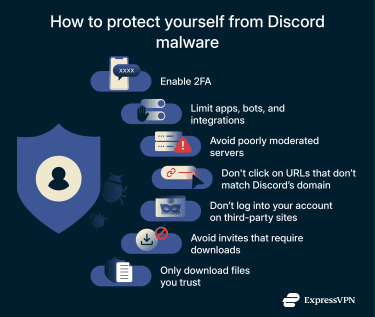
Enable two-factor authentication (2FA)
Turning on 2FA adds an extra layer of protection to your Discord account by requiring a one-time code from your phone whenever someone attempts to log in. Even if an attacker manages to steal your password through phishing or a fake login page, they still won’t be able to access your account without that second factor. While 2FA doesn’t prevent token-stealing malware, it does stop a huge portion of credential-based attacks and makes it far harder for someone to take over your account through stolen login details alone.
Limit apps, bots, and integrations
Only authorize bots from reputable developers or well-known communities, and review the permissions they request before approving them. If a bot asks for administrative access or the ability to manage your account when it doesn’t need those privileges, that’s a red flag. Likewise, avoid installing modified clients, plug-ins, or add-ons that aren’t supported by Discord, since they can capture data or create vulnerabilities without your knowledge.
Avoid poorly moderated servers
Discord servers that lack active moderation can allow spam and unverified links to circulate freely, increasing the risk of malware, phishing, or scams. To protect yourself, only join servers you trust and avoid clicking on links or downloading files from unknown or suspicious users.
Check that gift and invite links are legitimate
Malicious Nitro giveaways and phishing sites often imitate Discord’s branding but use lookalike URLs to trick users into clicking. Real Nitro gift links always come from discord.com/gifts, so any link with misspellings, extra words, hyphens, numbers, or unfamiliar domains should be treated as unsafe. If the URL doesn’t match Discord’s official domain exactly, it’s best not to open it.
Don’t log into your account through third-party pages
Discord will never ask you to enter your username and password on an external website to claim Nitro, join a server, or access a feature. If you’re taken to a login screen that isn’t hosted on discord.com, it’s almost certainly a phishing attempt designed to steal your credentials. Closing the page immediately is the safest option.
Avoid invites that require downloads
Legitimate Discord servers don’t require you to install software just to join. If an invite leads to a server that asks you to download a “verification tool,” “anti-bot checker,” or any other program before granting access, you’re almost certainly dealing with a malicious setup. These installers commonly contain malware disguised as security checks.
Only download files you trust
Before you open anything you’ve downloaded, make sure it comes from a source you actually recognize, like official websites, well-known developers, or trusted community members. It also helps to double-check that the file matches what was promised; if someone says they’re sending you a screenshot or document but the file arrives as an .exe, .zip, .bat, or .scr, treat it as suspicious.
And if a friend sends you a file that feels out of character or unexpected, ask them to confirm they really sent it, since compromised accounts often distribute malware without the owner realizing it.
How to remove Discord malware
Even if you’re careful, infections can still happen. The sections below outline what you should do to remove malware from your device.
Use antivirus software
The simplest and most effective way to remove malware is with a reliable antivirus program. Make sure to choose a reputable antivirus by looking at user reviews. Once installed, run a full system scan of your device. From there, follow the program’s recommendations to quarantine or remove any detected threats.
Manual cleanup
Below are some manual steps you can take to supplement antivirus scanning. These actions can help remove stubborn malware, repair the Discord app, or reset settings that antivirus software can’t fix on its own.
Kill malicious processes
Some malware can block antivirus scans or prevent infected files from being deleted. Killing the malware’s processes can stop that interference. On Windows, you can use Task Manager, and on macOS, Activity Monitor, to look for suspicious processes. Red flags include entries that you don't recognize, lack publisher information, or consume an unusually high amount of system resources without a clear reason.
Note that most malware will restart its processes when you reboot your device. Killing a malicious process is only a temporary measure while you implement a more permanent solution.
Windows
To kill a malicious process on Windows:
- Launch the Task Manager by pressing the Ctrl + Shift + Esc keys simultaneously.
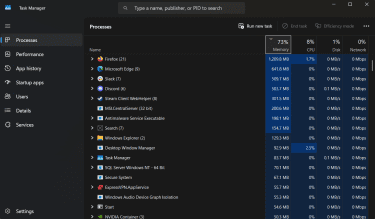
- Right-click on the process you want to terminate and select End task.

MacOS
To kill a malicious process on macOS:
- Open Spotlight by pressing the Command + Space keys simultaneously, search for “Activity Monitor,” and launch the app.
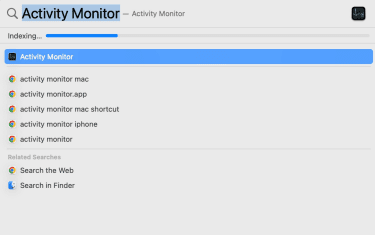
- Select the process you want to terminate, and click the grey X button at the top of the window.
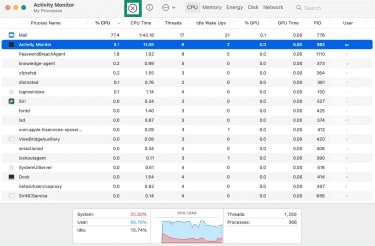
- Select Force Quit.

Reinstall Discord
If malware has compromised the Discord app’s program files, antivirus software may not be able to remove it completely. In these cases, you’ll want to uninstall Discord completely, then download and reinstall the latest version from the official website. This ensures any corrupted or malicious code in the app is fully replaced.
FAQ: Common questions about Discord malware
Is Discord safe from malware?
Discord is a safe platform in the sense that its core platform isn’t a common source of direct infection. Malware on Discord generally spreads when attackers misuse the platform to send fake links, malicious files, or convincing phishing messages.
How can I secure my Discord account?
The easiest way to secure your Discord account is by using a strong password. This makes it harder for attackers to guess or brute-force your credentials. You should also consider enabling two-factor authentication (2FA), which requires a verification code from your authentication app or device along with your password whenever you log in. This way, even if someone steals your password, they can’t access your account.
Can malware spread via voice channels or screen sharing?
No, malware can’t spread through Discord voice channels or screen sharing. In order to infect your device, an attacker needs to trick you into clicking on a malicious link or downloading something harmful.
How often does Discord update its security?
Discord updates its security on an ongoing basis, deploying fixes and improvements as vulnerabilities or needs arise. The platform also continually rolls out new security features, such as end-to-end encryption for calls, to enhance user safety.
Take the first step to protect yourself online. Try ExpressVPN risk-free.
Get ExpressVPN